Export FMU from Xcos
Export FMUs for Model Exchange and Co-Simulation Version 1.0
Description
Xcos model can be exported as an FMU for Model Exchange or for Co-Simulation. Actually, only generation of FMUs version 1.0 of FMI is supported. Code generation works by translation the Xcos super-block in FMU. Generated model can be imported in Xcos or in an another simulation tool.
Note: Before importing the FMU in another tool, you have to add Scilab DLLs to your PATH environment variable.
Export FMU step by step :
Create a Xcos model
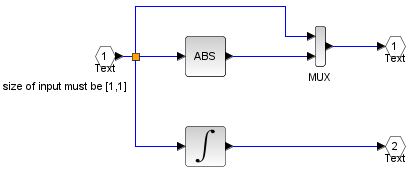
Creation of a simple Xcos model (integration and compute the absolute value of the input).
Create a super-block
A FMU generation is done through the Xcos super-block. First of all the user should do «selection to super-block». Note: inputs and outputs of your super-block must be connected (e.g. input is connected with a sinus, output with a scope). A single click on the super-block helps to select the block for further FMU generation.
Configure an FMU
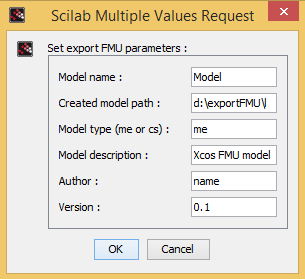
Open menu « Tools -> export FMU ». When dialog box appears, the user should set some parameters concerning the FMU generation.
Model name
string, which defines the name of FMU. This name will be used for the main identifier of model and the name of archived FMU file.
Properties : Type 'string' of size -1
Created model path
string, a path where will be stocked generated model. If a path does not exist, Xcos FMU generator will create it.
Properties : Type 'string' of size -1
Model type (me or cs)
string, type of future FMU for generation; me : FMU for FMI for Model Exchange; cs : FMU for FMI for Co-Simulation. For more information, see : Official site of the Functional Mockup Interfaces.
Properties : Type 'string' of size -1
Model description
string, a short description of FMU that will be added in the generated C-code and also in Xml-description of generated FMU.
Properties : Type 'string' of size -1
Author
string, the name of author that generates a FMU. This name will be added in C-code and in the Xml-description.
Properties : Type 'string' of size -1
Version
Version : string, the version of model (par example: 0.1 or 0.2 if any FMUs for the same super-block have been created). This version will be added in C-code and in the Xml-description file.
Properties : Type 'string' of size -1
Check of generated FMU
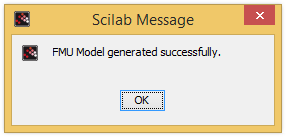
If an FMU has been generated successfully, you will see the the following dialog box.
Otherwise, you will see the following dialog box.
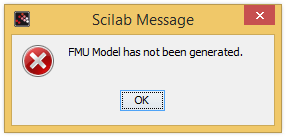
In this case, see the console of Scilab to find the error message.
Import generated FMU in Xcos
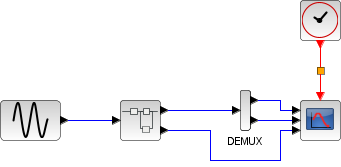
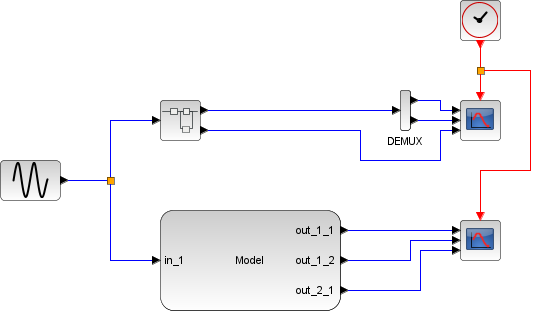
Generated model can be imported in Xcos using of current FMU import wrapper. For more information, please, see Import FMU. We connect a sinus to the inputs and the scopes to the outputs.
Limitations at the current version of Xcos FMU generator
Only explicit blocks are allowed for FMU generation. It is not always possible to provide an equivalent methodology in FMU generated in Xcos, for example the blocks with output activation ports are not supported yet for code generation. Also, some difference of the simulation results can be incurred for the Xcos blocks with input activation ports (par example: palette "discrete time systems"). Another limitation: only scalar inputs could be used for the FMUs that will be generated in Xcos. Also, one important limitation in the FMU generation is that the blocks with input/output activation ports are not supported for Co-Simulation models. In order to use FMUs for Co-Simulation generated in Xcos in another simulation tool the users must have installed Scilab on their PC.
There are also some Xcos blocks that can not be used for FMU generation(Model Exchange and Co-Simulation):
Commonly Used Blocks:
ANDBLK, CMSCOPE_f, CSCOPXY
Continuous time systems:
TIME_DELAY, VARIABLE_DELAY, PDE
Discontinuities:
DELAYV_F
Discrete time systems:
AUTOMAT, DELAYV_F
Lookup Tables:
INTRP2BLK_f
Event handling:
CLOCK_c, VirtualCLK0, ANDBLK, ANDLOG_f, CEVENTSCOPE, CLKGotoTagVisibility, CLKOUTV_f, CLKSOMV_f, EDGE_TRIGGER, END_c, ESELECT_f, EVTDLY_c, EVTGEN_f, EVTVARDLY, Extract_Activation, HALT_f, IFTHEL_f, M_freq, MCLOCK_f, MFCLCK_f, freq_div
Electrical
All blocks
Zero crossing detection
All blocks
Signal Routing
FROMMO, GOTOMMO, GotoTagVisibilityMO, GotoTagVisibility, ISELECT_m, RELAY_f, SELECT_m
Implicit
All blocks
Sinks
AFFICH_m, BARXY, CANIMXY, CANIMXY3D, CFSCOPE, CLKOUTV_f, CMAT3D, CMATVIEW, CMSCOPE, CSCOPE, CSCOPXY, CSCOPXY3D, END_c, HALT_f, OUTIMPL_f, TOWS_c, WRITEAU_f, WRITEC_f
Sources
CLKINV_f, CLOCK_c, READAU_f, READC_f, RFILE_f, Sigbuilder, TKSCALE
Thermo-Hydraulics
All blocks
Demonstrations Blocks
All blocks
User-Defined Functions
CBLOCK, CBLOCK4, DEBUG, MBLOCK, PDE, c_block, fortran_block, generic_block3, scifunc_block_m
| Report an issue | ||
| << Functional Mock-up Interface (FMU) | Functional Mock-up Interface (FMU) | fmiCompletedIntegrStep >> |