scifunc_block_m
Scilab function block
Block Screenshot
Contents
Description
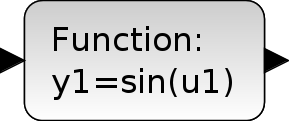
This block can realize any type of Scicos block. The function of the block is defined interactively using dialogue boxes and in Scilab language. During simulation, these instructions are interpreted by Scilab; the simulation of diagrams that include these types of blocks is slower.
Arguments
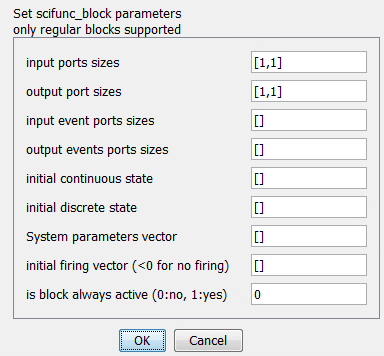
input ports sizes
a matrix. Number of regular input ports
Properties : Type 'mat' of size [-1 2]
Example : [1,1] for one input of size 1x1; [1,1;2,3] for two inputs of size 1x1 and 2x3
output port sizes
a matrix. Number of regular output ports
Properties : Type 'mat' of size [-2 2]
Example : [1,1] for one output of size 1x1; [1,1;2,3] for two outputs of size 1x1 and 2x3
input event ports sizes
a column vector. Number of input event ports
Properties : Type 'vec' of size -1
Example : [1] for one input event port; [1;1] for two input event ports
output events ports sizes
a column vector. Number of output event ports
Properties : Type 'vec' of size -1
Example : [1] for one output event port; [1;1] for two output event ports
initial continuous state
a column vector.
Properties : Type 'vec' of size -1
Example : [0;0] for two initial continuous states
initial discrete state
a column vector.
Properties : Type 'vec' of size -1
Example : [0;0] for two initial discrete states
System parameters vector
a column vector.
Properties : Type 'vec' of size -1
Example : [0.5;1.5;2.5] for three parameters
initial firing vector
a column vector. Size of this vector corresponds to the number of event outputs. The value of the i-th entry specifies the time of the preprogrammed event firing on the i-th output event port. If less than zero, no event is preprogrammed.
Properties : Type 'vec' of size sum(Number of output event ports)
Example : [1;2] 1 and 2 are the preprogrammed events firing that correspond to the first output event port and to the second output event port respectively
is block always active
Properties : Type 'vec' of size 1
Example : 1 the block is always active; 0 the block is not always active
Other dialogues are opened consecutively where the user may write Scilab code associated with the computations needed (block initialization, outputs, continuous and discrete state, output events date, block ending).
User-defined functions
The behavior of the Scilab function block is defined by user-written Scilab instructions. Each instruction set must be defined depending on the block configuration (and should match their count and size). The variables used are:
y1, y2, ..., yNthe values of the output signals
tthe current time
xthe continuous state
xdthe continuous derivative
zthe discrete state
u1, u2, ..., uMthe input signals
n_evithe event triggering the computation
t_evothe next time events
rparthe real parameters
- Compute the output
If the block output values, the user should define :
y1, y2, ..., yNfrom
t, x, z, u1, u2, ..., uM, n_evi, rparvariables.This is the most common instructions to define and they will be called at each time step.
- Compute the continuous state derivative
If the block has continuous state, the user should define:
xdfrom
t, x, z, u1, u2, ..., uM, rparvariables.The instructions will be for derivative evaluation in case of continuous state.
- Compute the state values
If the block has continuous or discrete state, the user should define:
x, zfrom
t, x, z, u1, u2, ..., uM, n_evi, rparvariables.The instructions will update the internal state of the block.
- Setup next event time
If the block generate events, the user should define :
t_evofrom
t, x, z, u1, u2, ..., uM, n_evi, rparvariables.The instructions will setup the next event times on the corresponding output event port.
- Re-initialize states
If the block has states, the user should define :
x, zfrom
x, z, rparvariables.The instructions will be called at the beginning of the simulation to initialize the states.
- Final values
The user can define:
x, zfrom
x, z, rparvariables.At the end of the simulation this will compute final state values.
- Imposing constraints
The user can define :
y1, y2, ..., yNfrom
x, z, u1, u2, ..., uM, n_evi, rparvariables.At the start of the simulation the instructions may be called multiple times to compute constraints.
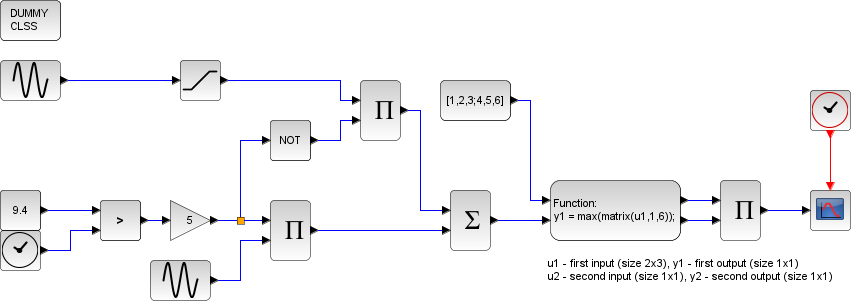
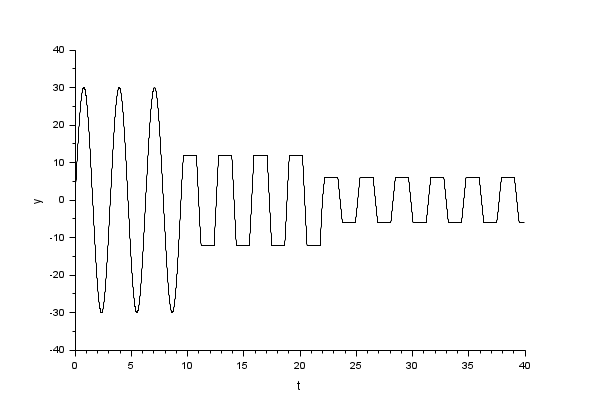
Example
Interfacing function
SCI/modules/scicos_blocks/macros/Misc/scifunc_block_m.sci
Computational function
SCI/modules/scicos/src/fortran/scifunc.f (Type 3)
| Report an issue | ||
| << MBLOCK | Userdefinedfunctions_pal | SUPER_f >> |